Tag Archives: sleep

Why Can’t Americans Sleep?


“People of all ages pop awake in the middle of the night and have trouble going back to sleep. One associates this phenomenon with anxiety if it happens in younger people, and no doubt that’s frequently the cause. But it also rhymes with what may be a natural pattern. Perhaps we’re meant to wake up. Perhaps broken sleep doesn’t mean our sleep is broken, because another sleep awaits.


And if we think of those middle-of-the-night awakenings as meant to be, Wehr told me, perhaps we should use them differently, as some of our forebears did when they’d wake up in the night bathed in prolactin, a hormone that kept them relaxed and serene. “They were kind of in an altered state, maybe a third state of consciousness you usually don’t experience in modern life, unless you’re a meditator. And they would contemplate their dreams.”


Night awakenings, he went on to explain, tend to happen as we’re exiting a REM cycle, when our dreams are most intense. “We’re not having an experience that a lot of our ancestors had of waking up and maybe processing, or musing, or let’s even say ‘being informed’ by dreams.”

https://www.theatlantic.com/magazine/archive/2025/08/insomnia-health-cognitive-behavioral-therapy/683257/

Discover the profound significance of waking up 3 AM to 5 AM

Learn how ancient Buddhist teachings guide us to use these early hours for self-reflection, mindfulness, and spiritual awakening. By understanding the deeper meaning of this time, we can cultivate inner peace, clarity, and a deeper connection to the universe.

Four transformative practices:

  1. Finding stillness through silent meditation
  2. Uplifting your spirit with gratitude and positive affirmations
  3. Purifying your body with warm water and intention and
  4. Reconnecting with nature by stepping outside

How to Set Up Sleep in the Health App

Thanks to iPhone Insider Tip of the Day

Why You’ll Love This Tip

The Health app now allows you to set up a Sleep Schedule that works with your Sleep Focus on iPhone to help you get a good night’s sleep. Find out how to set up Sleep in the Health app.

  • Go to bed on time with a bedtime reminder on your iPhone.
  • Get a healthy amount of sleep by setting up a Sleep Schedule and Sleep Goal on your iPhone.

How to Set Up Sleep in the Health App

System Requirements

This tip was performed on an iPhone 16 running iOS 18.3.1. Find out how to update to the latest version of iOS.

You can use the Sleep in the Health app to improve your sleep routine. Here’s how to use Sleep to set up Sleep Goals on your iPhone, change Sleep Goals, set up a Sleep Schedule, set a Bedtime Reminder and wakeup alarm, and more. Now, here’s how to set up Sleep in the Health app:

  1. Open the Health app.
  2. Tap the Browse tab.
    img_5194.jpeg
  3. Scroll down and tap Sleep.
    tap sleep in health app
  4. If this is your first time accessing the Sleep settings, tap Get Started to set up your Sleep Schedule.
  5. Tap You do not have a Sleep schedule under Full Schedule & Options.
    tap you do not have a sleep schedule
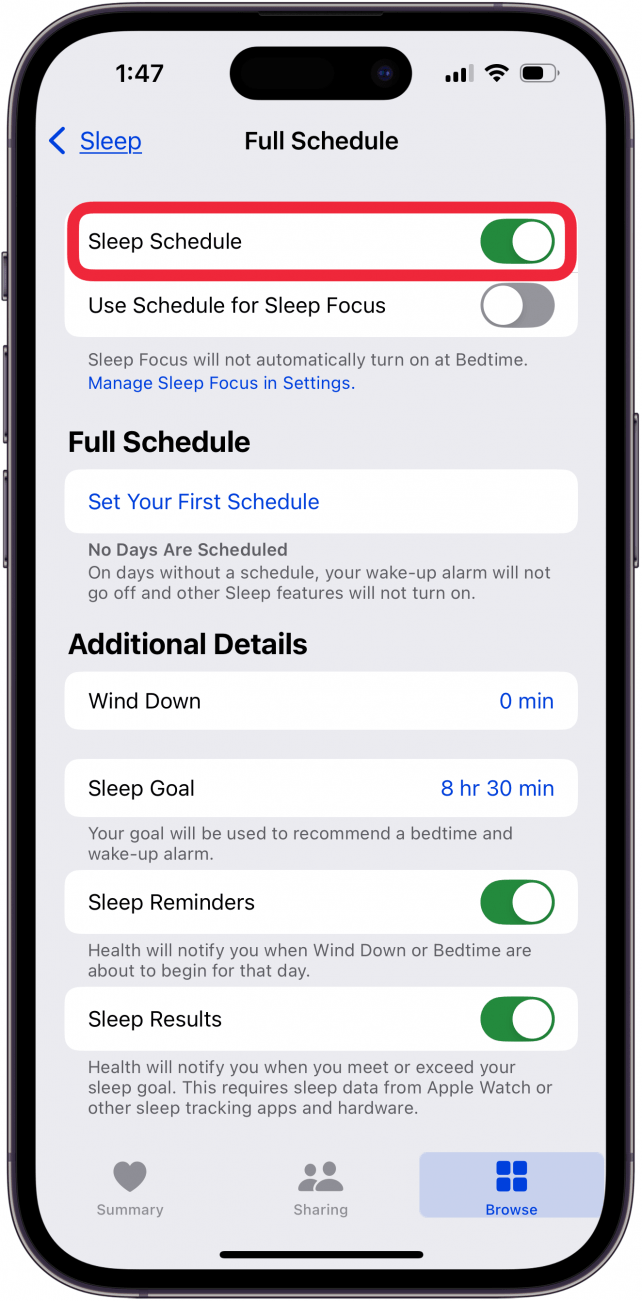
  6. Toggle on Sleep Schedule.
    toggle on sleep schedule
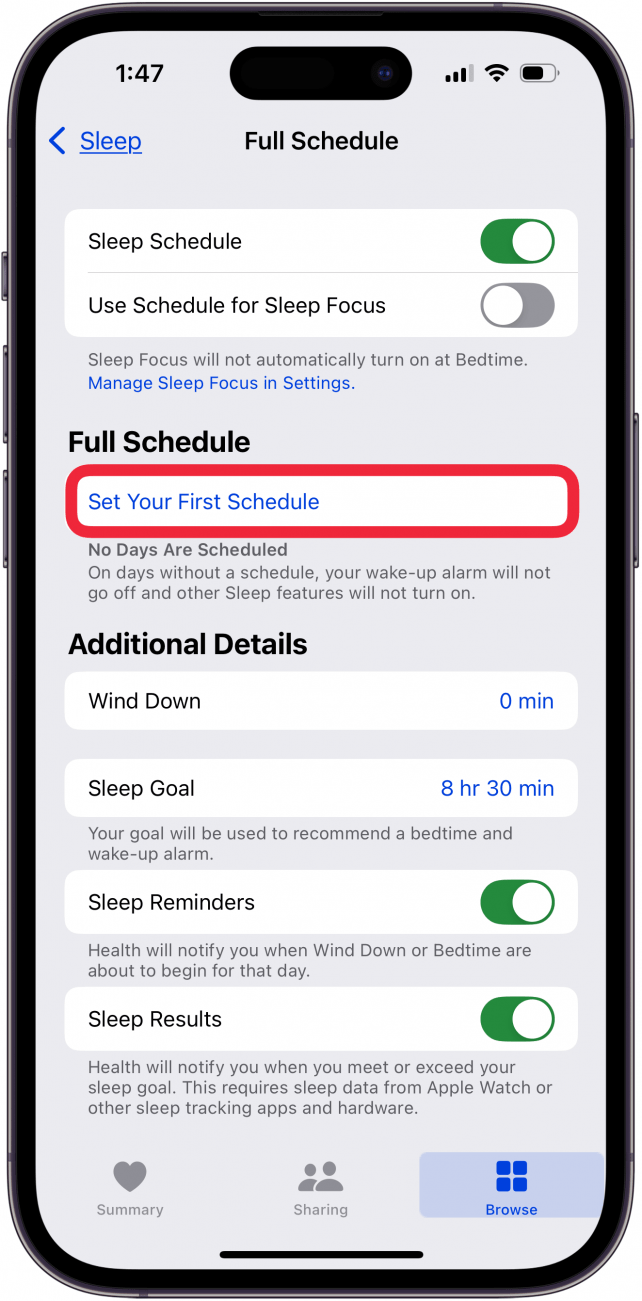
  7. Tap Set Your First Schedule.
    tap set your first schedule
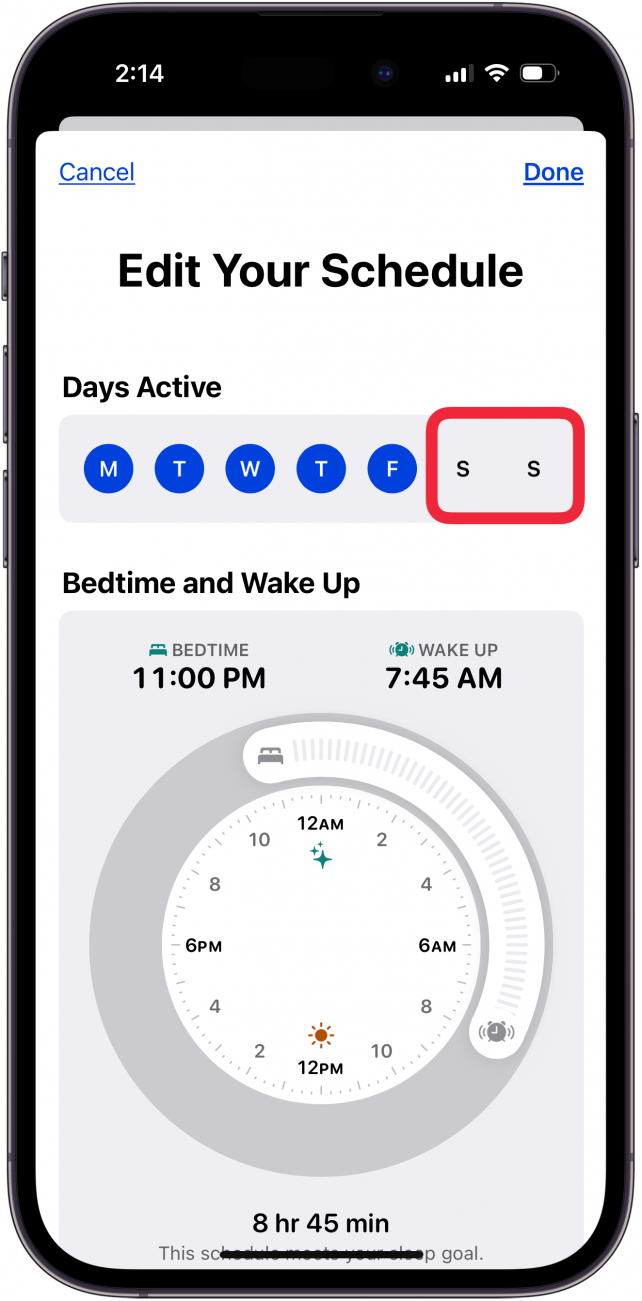
  8. Tap the days you DON’T WANT included in your sleep schedule.
    tap days you don't want included in sleep schedule
  9. To set your bedtime and wake-up times, drag the Bedtime and Wakeup sliders to when you want to go to sleep and wake up.
    adjust bedtime and wakeup sliders
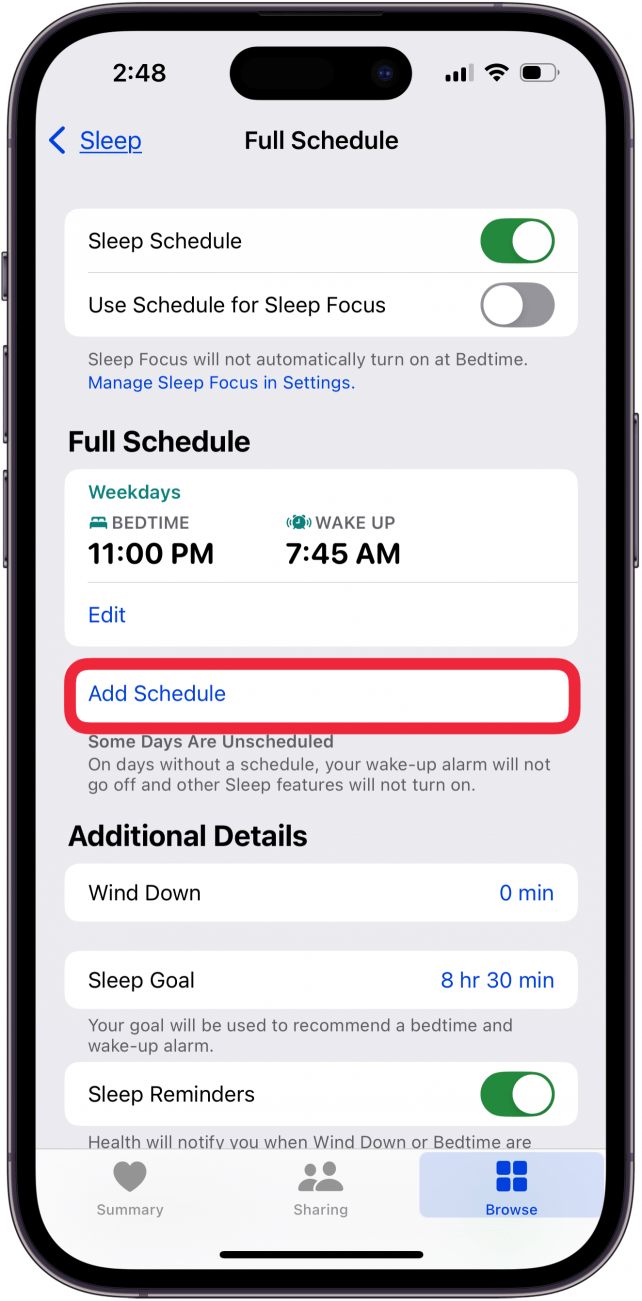
  10. If you have multiple sleep schedules, you can tap Add Schedule.
    tap add schedule
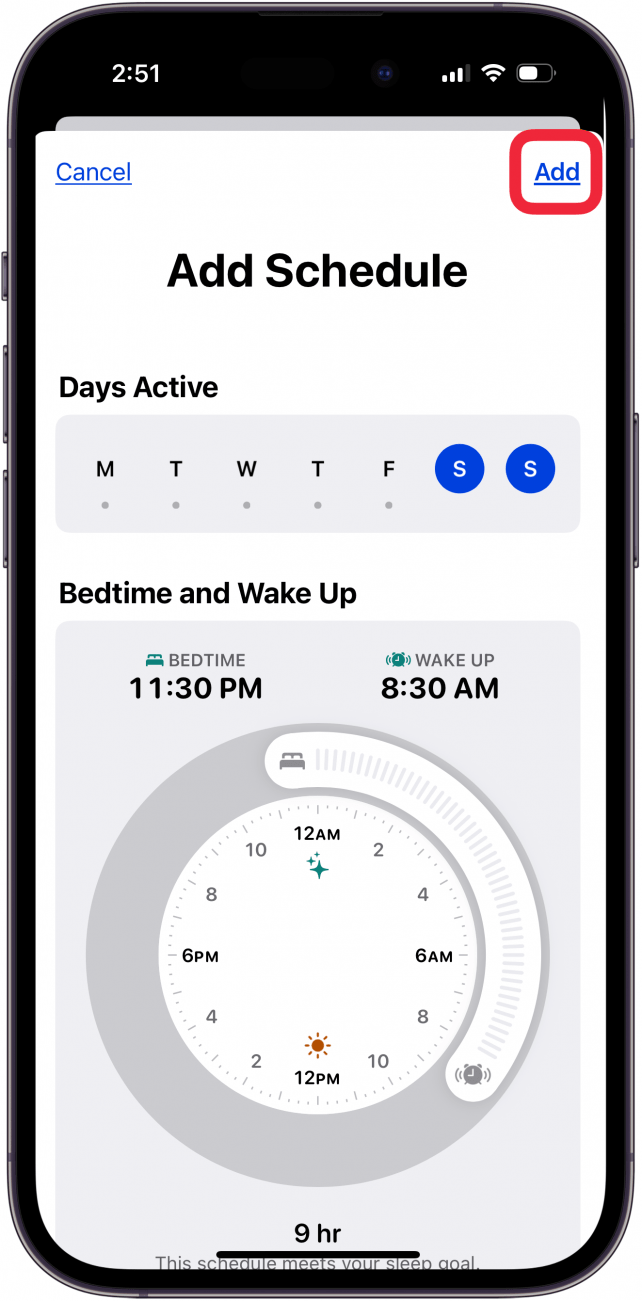
  11. The unscheduled days (in this case Saturday and Sunday) will be highlighted, and you can use the Bedtime and Wakeup sliders to set the sleep schedule as before, and tap Add.
    edit second sleep schedule and tap add
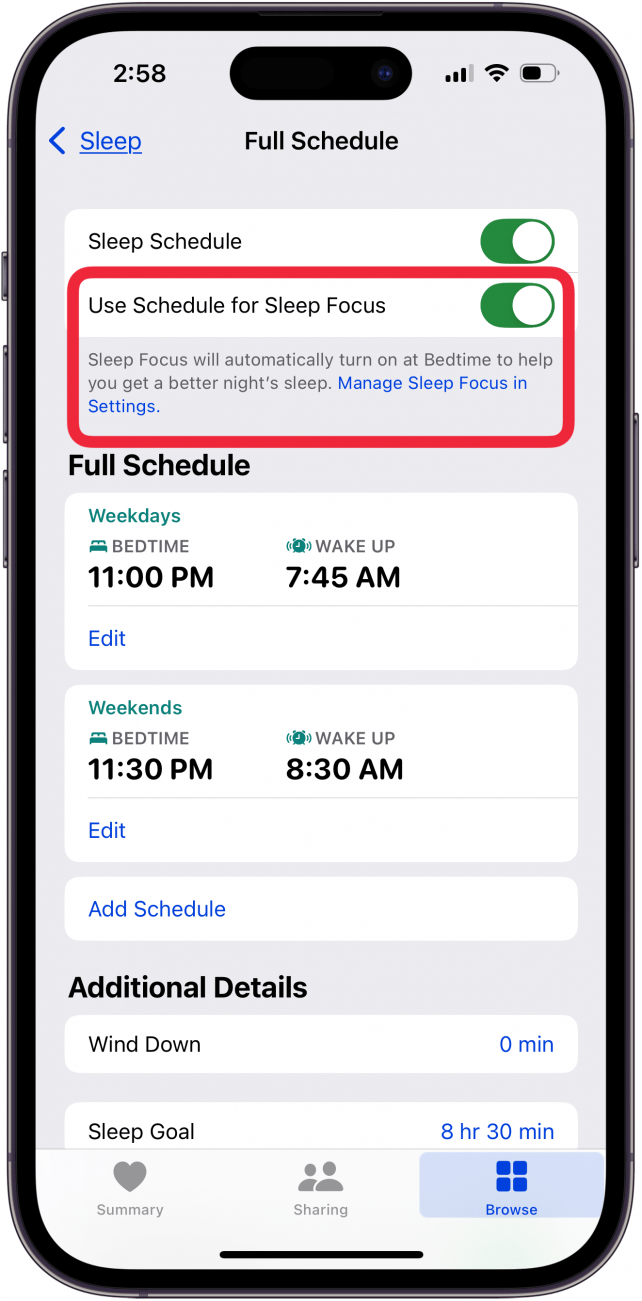
  12. Toggle on Use Schedule for Sleep Focus to have your Sleep Focus turn on automatically at Bedtime. If this is your first time setting up Sleep, this menu may look different than the screenshot below.
    toggle on use schedule for sleep focus
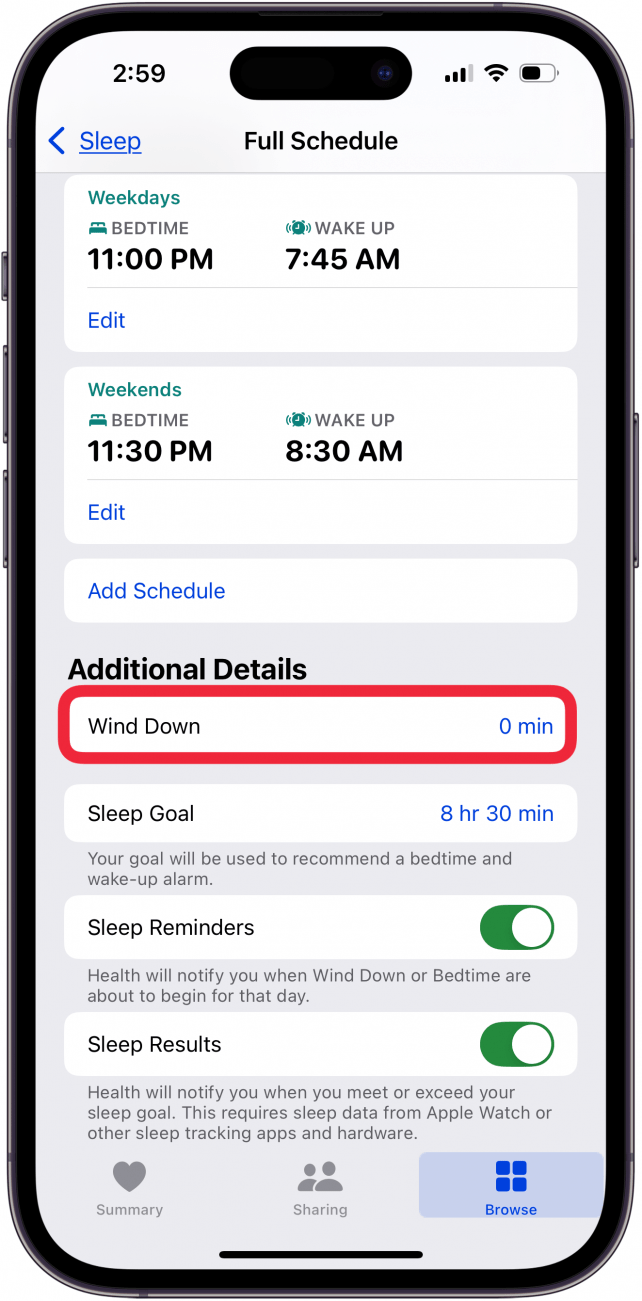
  13. Tap Wind Down under Additional Details.
    tap wind down
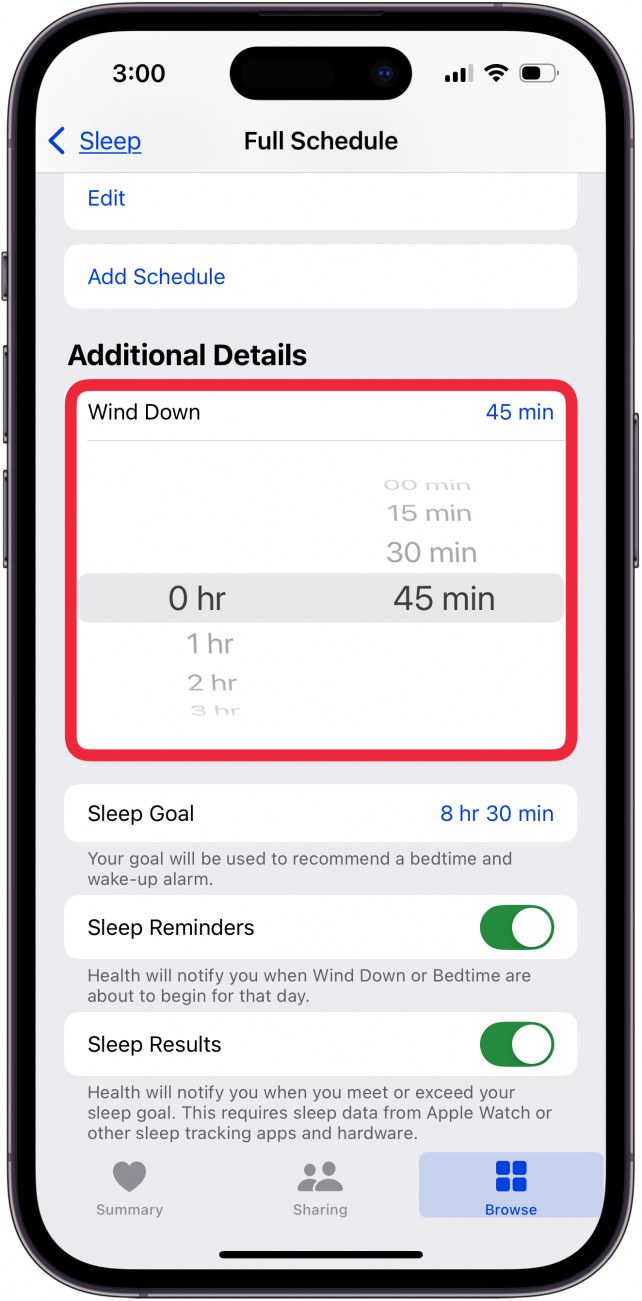
  14. Scroll to set how long before bed you would like to start winding down. If this is your first time setting a Wind Down time, this menu may look different than the screenshot below.
    select wind down time
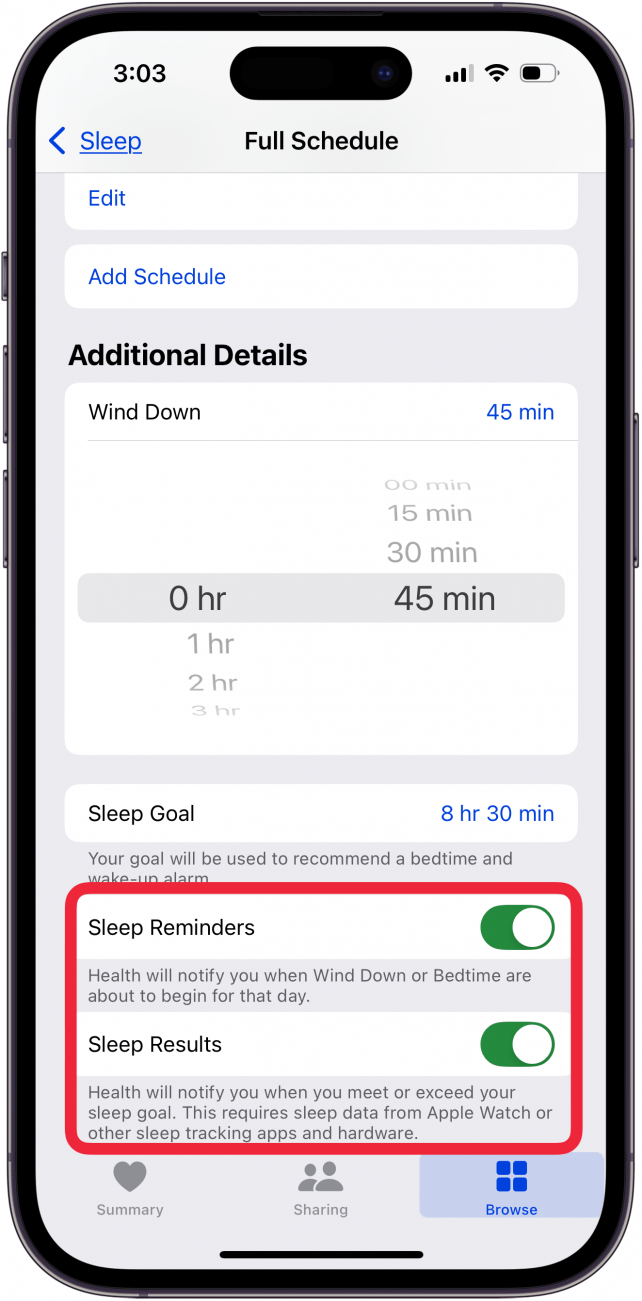
  15. You can also toggle on Sleep Reminders and Sleep Results
    toggle on sleep reminders and sleep results if desired
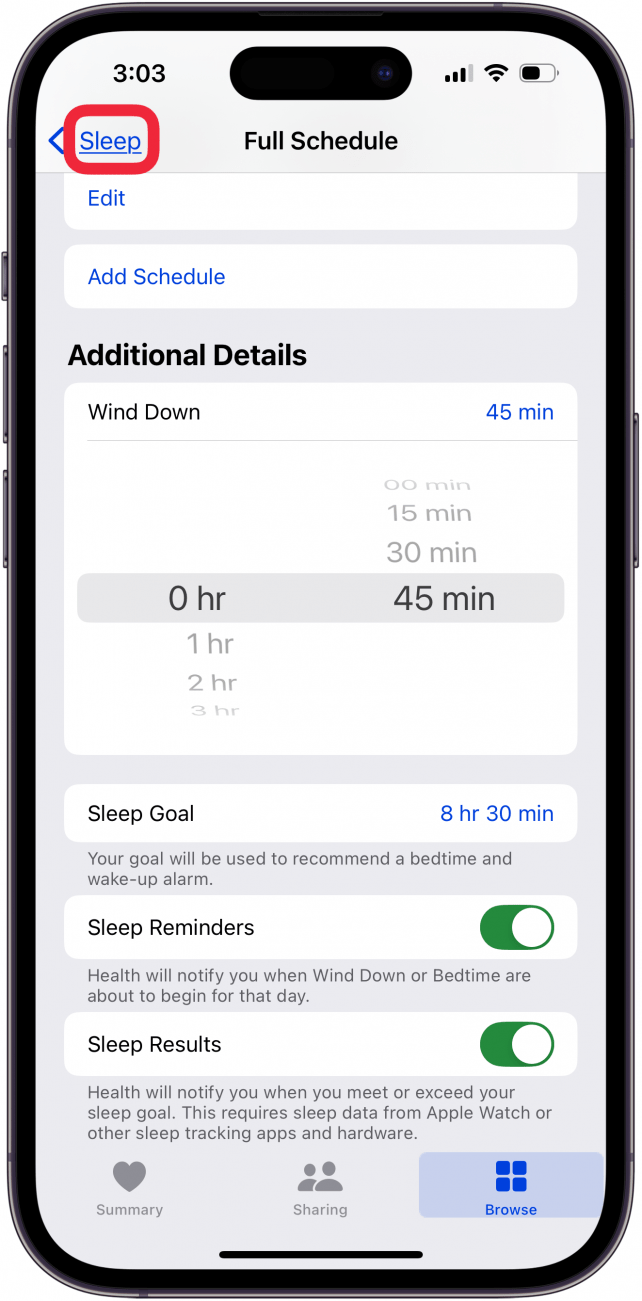
  16. Tap Sleep to return to the previous page.
    tap sleep
  17. If you ever want to edit your Sleep Schedule, simply repeat steps 1-3, and then scroll down and find Your Schedule. Then, tap Edit under Next to only edit your next Sleep Schedule.
    tap edit to change sleep goal iphone
  18. Tap Full Schedule & Options to edit your full schedule, as well as adjust settings like Wind Down time and your Sleep Goal.
    tap full schedule and options to change sleep goal iphone

Now you’ve set up Sleep in the Health app! You can adjust your schedule whenever you want, and if you have an Apple Watch, you can see data like respiratory rate, heart rate, and how many hours of sleep you are averaging.

Mastering Sleep

A Deep Dive into Cognitive Behavioral Therapy for Insomnia

Summary of a podcast by Dr Peter Attia and Ashley Mason

Introduction

Ashley Mason, PhD, is an Associate Professor at UCSF, leading the Sleep, Eating, and Affect (SEA) Lab and directing the COAST Center. Her work focuses on non-pharmacologic treatments for mood, sleep, and eating disorders, with a central focus on cognitive behavioral therapy for insomnia (CBT-I). In a conversation that serves as a master class, Dr. Mason breaks down the science, structure, and strategies of CBT-I—an intervention she champions as life-changing and highly effective.


What Is Insomnia?

• Definition: Chronic sleep issues persisting >3 months, causing distress or functional impairment.

• Prevalence: Affects 5–10% of adults at any time; 90% will experience it episodically.

• Diagnosis: No lab test—diagnosed clinically based on history and pattern.


The CBT-I Approach

Dr. Mason’s clinical model centers on five pillars:

1. Stimulus Control: Bed = sleep (and sex) only. No TV, phones, or reading.

2. Time in Bed Restriction: Match time in bed to actual sleep ability + 30 mins.

3. Cognitive Restructuring: Reframe catastrophic thoughts around sleep.

4. Relaxation Techniques: Focused body scans, progressive muscle relaxation.

5. Sleep Hygiene: Regulate light, temperature, caffeine, and bedtime habits.


How Insomnia Starts—and Stays

• Predisposing Factors: Genetic tendencies (e.g., light sleeper, high anxiety).

• Precipitating Events: Life stressors (divorce, job loss) trigger acute insomnia.

• Perpetuating Behaviors: Naps, sleeping in, screen use in bed, and inconsistent schedules prolong it.

Dr. Mason intervenes not at the origin, but at the behaviors keeping insomnia alive.


Tools and Tactics

• Scheduled Worry Time: Set a daily time to worry—offload anxiety from bedtime.

• Sleep Diaries: Track sleep patterns, test interventions, and calculate efficiency.

• A/B Testing: Isolate single variables (e.g., blue light glasses) for 2 weeks to test impact.


Key Sleep Hygiene Tips

• Consistent Wake Time: More critical than bedtime. No sleeping in.

• Temperature: Cool room (mid-60s°F); warm hands/feet to fall asleep.

• Fluid Intake: Reduce liquids after dinner to minimize night awakenings.

• Alcohol/Caffeine: No caffeine after 11 A.M.; no alcohol during CBT-I.


Medication and Supplement Use

• Avoid melatonin unless clearly indicated (e.g., beta blocker use).

• Eliminate sleep medications gradually with precision and physician support.

• Avoid rotating OTC and prescription meds—standardize and stabilize.


CBT-I Implementation at UCSF

• Program Structure: Intake → 5 weekly group sessions → follow-up.

• Group Format: 8 patients per cohort; group dynamic enhances adherence.

• Telemedicine: Fully remote access for California patients.


The Role of Digital Tools and AI

• Current apps show moderate promise, but personalization and accountability are challenges.

• Dr. Mason supports the development of AI-assisted programs (e.g., Rest) to democratize CBT-I.


Additional Sleep Disruptors to Rule Out

• Sleep Apnea / RLS: Screen and refer before starting CBT-I.

• Medication Side Effects: Some blood pressure meds suppress melatonin.


Practical Behavioral Advice

• Avoid Napping: Unless >80 years old, limit to 25 minutes max.

• Middle-of-the-Night Awakenings: Leave bed, do boring (non-stimulating) tasks until sleepy again.

• Social Jet Lag: Never sleep in two days in a row; choose which weekend day to feel rested.


Sleep, Anxiety, and the Cognitive Link

• Track belief in distressing thoughts across the day—most lose power by afternoon.

• CBT-I reframes distorted sleep-related beliefs, improving both sleep and mood.


Thermal Interventions and Future Research

• Sauna: May help some; trial shows promise combining heat therapy + CBT-I.

• Cold Plunge: Discouraged before bed—raises core temp post-exposure.


Takeaway

“You don’t have to know what caused your insomnia. Just do the treatment. It works when you do it.” – Dr. Ashley Mason

CBT-I is among the most effective psychological treatments available, with 70% of patients achieving clinically meaningful results. While adherence is essential, the payoff is substantial—better sleep, improved functioning, and often, life transformation. No one should have to suffer from insomnia. Access may be challenging, but tools exist—from books to digital apps—that can initiate recovery.


Recommended Resources

• Quiet Your Mind and Get to Sleep by Rachel Manber & Colleen Carney

• Sleep diaries (paper preferred)

• Society of Behavioral Sleep Medicine directory

• Rest (AI-supported CBT-I app in development)

Start now. It won’t be easy, but it will be worth it.

Sleep is Good and May Prevent Dementia Too!

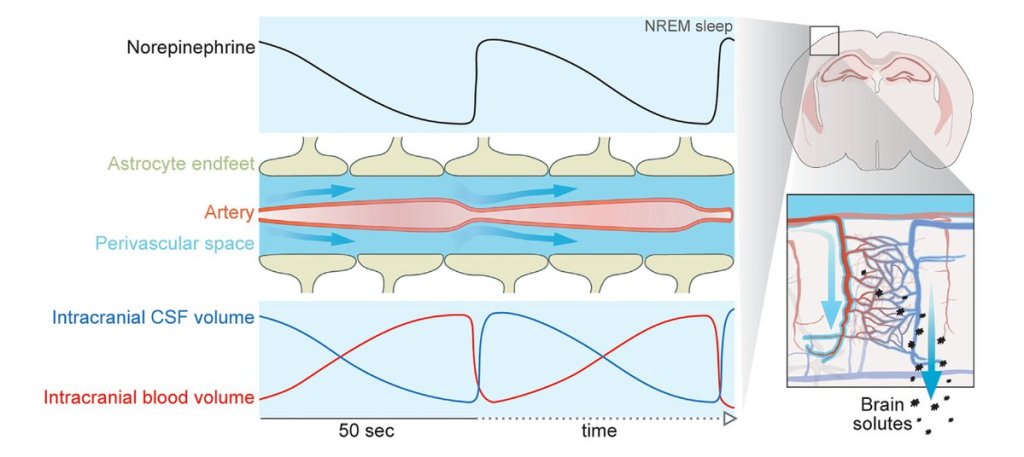
How the brain gets rid of its chemical waste through the glymphatics during sleep, via blood vessel oscillations, regulated by norepinephrine. Impeded by Ambien.

• Norepinephrine release from the locus coeruleus drives slow vasomotion in NREM sleep

• Infraslow norepinephrine oscillations control opposing changes in blood and CSF volumes

• Norepinephrine oscillation frequency during NREM sleep predicts glymphatic clearance

• The sleep aid zolpidem suppresses norepinephrine oscillations and glymphatic flow

https://www.cell.com/cell/abstract/S0092-8674(24)01343-6

https://www.science.org/content/article/scientists-uncover-how-brain-washes-itself-during-sleep

Vitals on the Apple Watch (from iPhone Insider)

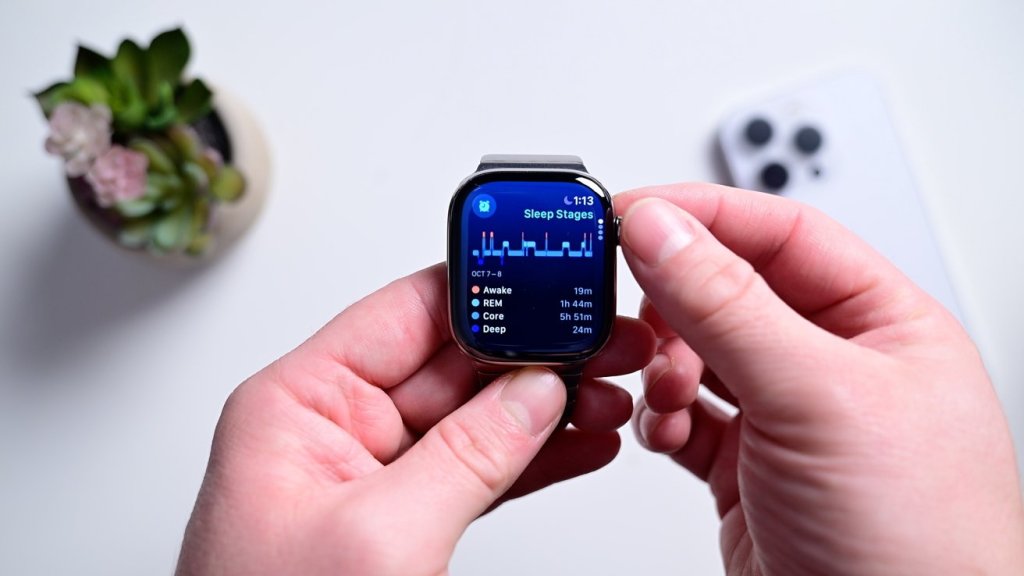
Track sleep, heart rate, respiratory rate, temperature, blood oxygen, and sleep duration on your Apple Watch. Here’s how, from iPhone Insider (Dr Bob recommends signing up for lots of great tips and guidance on how to use your Apple Watch and iPhone 🤗

Paywalled Link on iPhone Insider

Why You’ll Love This Tip:

vitals.jpeg

In the latest version of watchOS, the Apple Watch now has a dedicated Vitals app. The Vitals app collects your health data as you sleep and brings it all together in one convenient location. Let’s take a look at the new Apple Watch Vitals app.

  • Keep track of your health data in one convenient app.
  • Compare your current vitals with the previous week.

How To Use the Vitals App on Apple Watch

System Requirements

This tip works on Apple Watches running watchOS 11 or later. Find out how to update to the latest version of watchOS.

One of the best Apple Watch features is the ability to track your sleeping habits, like your average respiratory rate and heart rate. Now, the Vitals app provides you with a breakdown of your heart rate, respiratory rate, wrist temperature, blood oxygen level, and your sleep duration. All of this data is available in one convenient app. Here’s how to navigate the Vitals app on Apple Watch:

  1. Open the Vitals app.
    img_3220.png
  2. If this is your first time opening this app, you’ll be greeted by an explanation of the app. Scroll down and tap Next.
    img_3221.png
  3. You’ll also be asked to enable notifications for this app. Tap Enable or Skip.
    img_3222.png
  4. At the top, you’ll see an overall look at your Overnight Vitals. Tap the info icon for more details on what your vitals mean.
    img_3223_0.png
  5. You can scroll down and select More Info.
    img_3224_0.png
  6. This screen will tell you the difference between Typical and Outlier vitals. Tap the X to close this screen.
    img_3226_0.png
  7. Scroll down to see individual breakdowns of each of your vitals. First, is Heart Rate. Like the Overnight Vitals, you can tap the info icon for more details on each Vital.
    img_3227_0.png
  8. Scroll down to see your Respiratory Rate.
    img_3228_1.png
  9. Next, is your Wrist Temperature.
    apple watch vitals app with a red box around wrist temp
  10. Continue scrolling to see your Blood Oxygen level.
    apple watch vitals app with a red box around blood oxygen
  11. Lastly, you can see your Sleep Duration, which is how much sleep you got the night before.
    apple watch vitals app with a red box around sleep duration
  12. You can tap the Calendar icon to toggle between Today’s Vitals and the past 7 days’ Vitals.
    apple watch vitals app with a red box around calendar icon
  13. This will show you how your vitals last night compare to the previous 7 days.
    apple watch vitals app with a red box around a 7 day graph showing vitals data over the past week

That’s how to navigate the new Vitals app in watchOS 11. Each of these data points can be found in separate apps, like Heart Rate, Blood Oxygen, and Sleep, so it’s nice to have it all available at a quick glance. The Vitals app will learn you typical sleep behaviors and if there is ever an outlying bit of data, you’ll get a notification to help you improve your sleep.

Entering a New Era in Sleep-Apnea Treatment

TL:DR 50% reduction in AHI (apnea-hypoxia index) and a lowering of blood pressure (which may reduce risk of stroke and heart attack!)

Obstructive sleep apnea is one of the most common respiratory disorders worldwide. Persons with obstructive sleep apnea can have loud snoring that is detrimental to social relationships and have breathing problems that result in recurrent nocturnal awakenings, unrefreshing sleep, and excessive daytime sleepiness — effects that together can substantially impair quality of life.

The improvement in systolic blood pressure that was seen with tirzepatide was substantially larger than effects seen with CPAP therapy alone7 and indicate that tirzepatide may be an attractive option for those patients who seek to reduce their cardiovascular risk

The initial results from the SURMOUNT-OSA trial show the usefulness of tirzepatide as an adjunctive treatment to address coexisting obesity in patients with obstructive sleep apnea. Weight loss resulting from tirzepatide treatment may be leveraged to expand the populations that may benefit from second-line treatments for obstructive sleep apnea.

https://www.nejm.org/doi/full/10.1056/NEJMe2407117

Understanding and Overcoming Midnight Wake-Ups: A Guide to Restful Nights

Have you ever found yourself abruptly awake in the middle of the night, wondering why sleep eludes you? You’re not alone. Midnight awakenings are a common phenomenon that can disrupt our sleep patterns and leave us feeling fatigued the next day. But what causes these interruptions, and how can we tackle them effectively?

People wake up at night for various reasons. Some of the common ones include:

  • stress and anxiety
  • discomfort or pain
  • need to use the bathroom
  • environment disruptions such as noise, movement, feeling too hot or too cold
  • sleep disorders such as sleep apnea or restless leg syndrome
  • disruption of the body’s natural sleep-wake cycle

A Strategy for Returning to Sleep

  1. Avoid time-reading: When you wake up in the middle of the night, avoid reaching for your phone or looking at the clock.
  2. Stay in bed and relax: First see if you can fall back asleep. You can try techniques like progressive relaxation, breathing exercises, white noise machines, and other methods that may help you relax.
  3. Get out of bed: If you can’t fall back asleep after an estimated 10-15 minutes, it’s time to get up. This is to disassociate the bed with activities other than sleep.
  4. Low-Stimulation Activities: Engage in a quiet, low-stimulation activity such as reading a book or doing a calming activity until you feel sleepy again, then return to bed. If you don’t feel sleepy enough to go back to bed, just get up and start your day.

https://lumos.tech/blogs/news/understanding-and-overcoming-midnight-wake-ups-a-guide-to-restful-nights

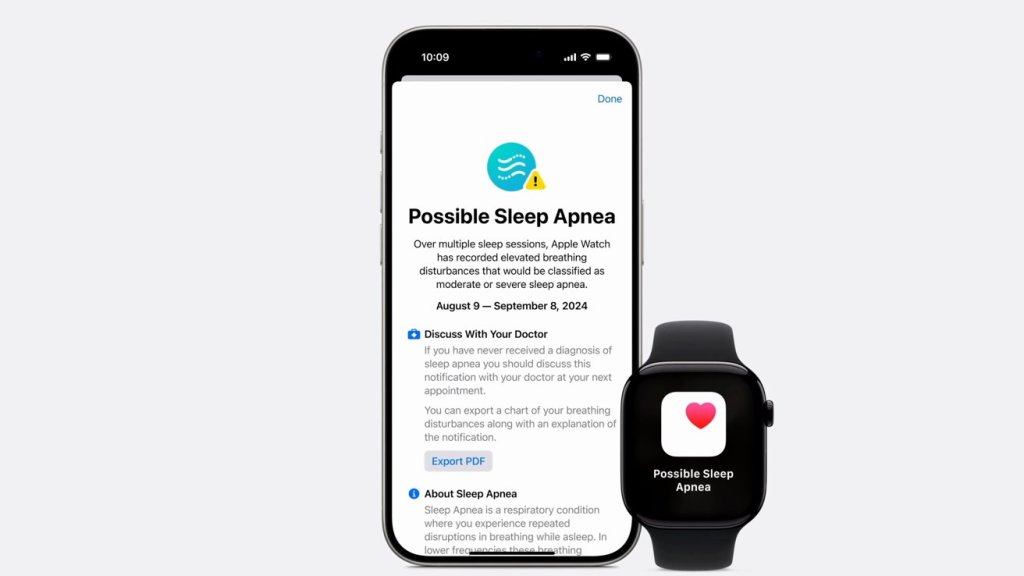
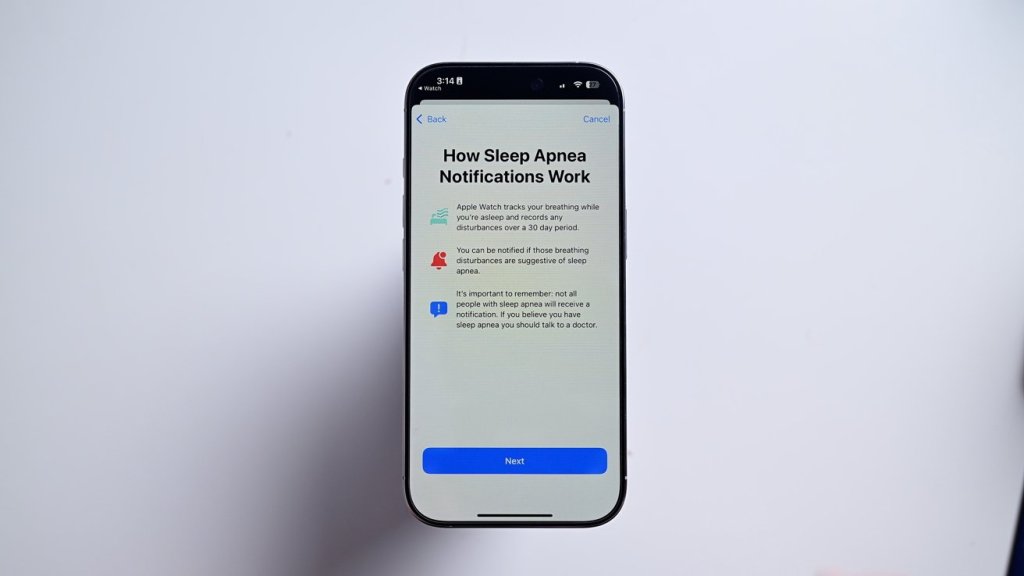
How to detect sleep apnea with Apple Watch

It’s quick and easy to set up sleep apnea detection. It is done from your iPhone.

• Open the Health app on your iPhone

• Go to Browse and search for “breathing disturbances”

• The first time you’ll see a button at the top that says “set up”

• Answer a couple qualifying questions and hit continue

• The app gives you a brief explainer, after which you can hit next

Viewing your sleep apnea results

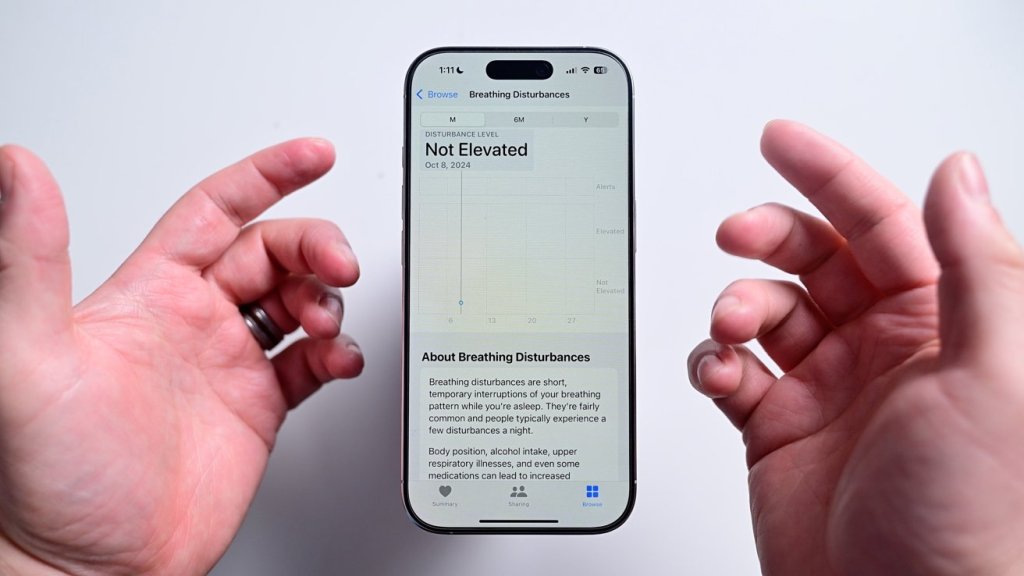
As soon as your first night you’ll see your results reflected in the Health app. If it detects an elevated level of breathing disturbances, it will proactively send you an alert.

If you want to view the data for yourself, you can open the Health app once more and navigate back to breathing disturbances. It will show each night’s results on a graph on a scale from not elevated to elevated. You can view it for each night or over time. To be clear, if a positive detection is triggered, it’s not diagnosing you with anything. The data can be exported and shared with your health care provider where they can make a further diagnosis.

https://appleinsider.com/inside/apple-watch/tips/how-to-detect-sleep-apnea-with-apple-watch

Mounjaro for Sleep Apnea

Among persons with moderate-to-severe obstructive sleep apnea and obesity, tirzepatide (Mounjaro, Zepbound) reduced the AHI, body weight, hypoxic burden, hsCRP concentration, and systolic blood pressure and improved sleep-related patient-reported outcomes.